Math
The math module is plain Nim, so it works the same on every platform and never touches the GPU. It gives you random numbers, noise, Bezier curves, polygon triangulation, vectors with the usual operators, and a handful of small geometry and color helpers.
Random
There is a global generator you reach through random, and a seeded one you make yourself with newRng. The global one is for the common case where you just want a number.
let a = random()             # 0 up to but not including 1
let b = random(10.0)         # 0 up to 10
let c = random(5.0, 9.0)     # 5 up to 9
let n = randomInt(1, 6)      # a die roll, both ends included
let g = randomNormal(0.0, 1.0)   # a bell-curve sample
When you want a sequence you can reproduce, make your own generator with a seed. The same seed always gives the same numbers, which is what you want for a level you can regenerate or a replay. It is a PCG generator rather than the standard library's, so the sequence stays stable across platforms.
var rng = newRng(12345)       # (1)!
let x = rng.random()          # (2)!
let y = rng.randomInt(0, 100) # (3)!
rng.setSeed(12345)            # (4)!
- Make a seeded generator; the same seed gives the same sequence.
- A float from 0 up to 1, drawn from this generator.
- An integer from 0 to 100, both ends included.
- Start the same sequence over.
setRandomSeed reseeds the global generator the same way.
Noise
Noise gives you smooth pseudo-random values that change gradually as the input moves, which is what makes it good for terrain, clouds and organic movement. noise is Perlin noise in its 2D and 3D forms and simplexNoise is the simplex kind, both returning a value from 0 up to 1. There is also a 1D noise, which is value noise rather than Perlin, still smooth and in the same range.
let v = noise(x * 0.05, y * 0.05)          # scale the input to set the feature size
let t = noise(x * 0.05, y * 0.05, time)    # animate by moving along the third axis
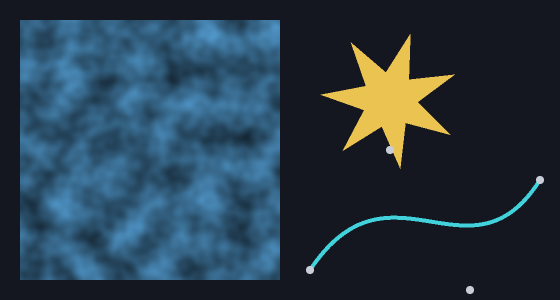
Smaller multipliers on the input give larger, smoother features, and larger ones give finer detail. The square below is Perlin noise at two scales mixed and written into an ImageData; next to it, a concave star filled by ear-clipping triangulation and a Bezier curve with its control points.
Bezier curves
A BezierCurve is built from control points and gives you a smooth path through them. evaluate returns the point at a parameter from 0 to 1, and render samples the whole curve into a list of points you can hand straight to line. derivative gives back the curve whose evaluation is the original's tangent, which is how you point something along the path it is following.
let curve = newBezierCurve(@[(0.0, 0.0), (120.0, 200.0), (300.0, 40.0)])
let mid = curve.evaluate(0.5)      # the point halfway along
nim2d.line(curve.render(40))       # draw it
Triangulation
triangulate breaks a polygon into triangles by ear clipping and returns indices into the points you passed. You rarely call it directly, since filled polygon already uses it so concave shapes fill correctly, but it is there if you want to build a mesh from an outline. isConvex tells you whether an outline is convex.
Helpers
distance and angle work on either four numbers or two points, and lerp blends two numbers. gammaToLinear and linearToGamma convert a color, or a single channel, between sRGB gamma space and linear space, which matters when you blend or light colors and want the result to look right.
There is also a standalone transform. newTransform gives you an identity transform you can translate, rotate, scale and shear, and transformPoint runs a point through it. This is the same matrix the drawing transform stack uses, so it composes the same way.
Vectors
Vec2 is the (x, y) float tuple used for positions throughout nim2d, and the math module gives it the usual operators, so you can do vector math directly: +, -, unary -, * and / by a number, and +=, -=, *=. vec2(x, y) makes one, length and lengthSq measure it, normalized scales it to length one, dot is the dot product, lerp blends two vectors, rotated turns one by an angle, and fromAngle builds one from an angle and a length. Because Vec2 is a plain tuple, all of this works on bare literals like (10.0, 20.0) too.
var pos = vec2(100, 100)
let vel = fromAngle(0.4, 60)   # 60 px/s heading at 0.4 radians
pos += vel * dt
See also
The runnable noise example, and the math API reference.