Examples
The examples folder has runnable demos, each a single file. Run any of them with nim c -r examples/<name>.nim, or run the showcase with nimble examples.
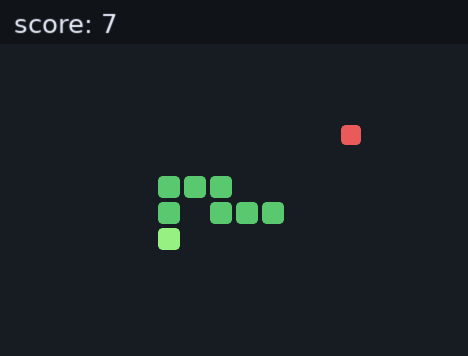
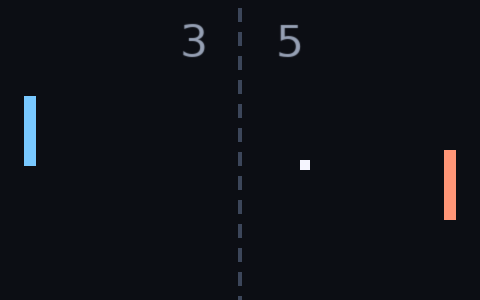
Three of them are complete little games. snake.nim has a grid, steering by arrows or WASD, a score, and a restart after you lose, and pong.nim plays against a simple AI, moving the left paddle with W and S or the arrow keys.
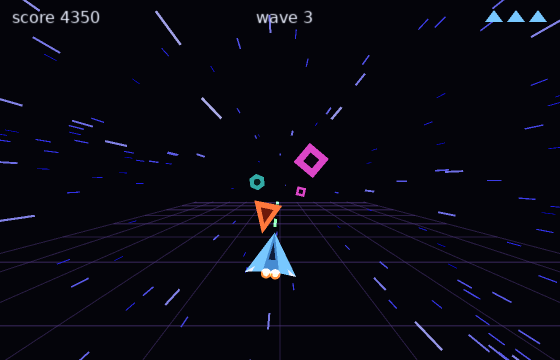
starfield.nim is a fake-3D shmup. Enemies dive at you over a perspective ground grid, growing as they close in; steer with the arrow keys or the mouse, hold space or the left button to fire, and survive waves that keep getting faster and meaner. Between waves the stars stretch into a warp jump, the screen shakes when you take a hit, and the run keeps score across three lives, restarting on R. The whole 3D effect is one divide: a point at depth z lands at center + position * focal / z, the same projection the background stars use.
The rest, in the order you might explore them:
all.nimis a showcase that touches most of what nim2d does: shapes, an image, a canvas, text and input.bounce.nimdrops balls under gravity that bounce off the walls. Click to spawn one, space for a burst, c to clear.particles.nimis a particle fountain that follows the mouse and uses additive blending for the glow. Click for a firework.clock.nimdraws an analog clock from the system time, with ticks, hands and a digital readout.transforms.nimshows the transform stack with orbiting, self-spinning satellites and a pulsing row of squares.camera.nimflies a glowing orb across a world wider than the window and flips between two cameras, a close follow view and a pulled-back tilted overview, blending smoothly between them on each switch. It pins gate labels withtoScreen, drops a ping at the world point under the cursor withtoWorld, and usesimport nim2d/camera.collide.nimis a live reference for the collide module, a panel for each test that reacts to the mouse, so you can watch every overlap, point, segment and resolution check light up as a probe shape moves against a fixed one. It usesimport nim2d/collide.tween.nimis a chart of every easing curve in the tween module, a cell per curve with a dot tracing along it on a shared clock, rows for the families and columns for the in, out and in-out variants, with a ball up top riding one curve at a time through aVecTween. It usesimport nim2d/tween.schedule.nimdrives a small clockwork from a scheduler: a metronome oneverypulses a ring, each beat queues an offbeat withafter, every fourth beat runs aduringsweep, and a feed lists the callbacks as they fire. Click to queue a burst, space cancels the metronome, C clears every timer. It usesimport nim2d/schedule.scene.nimmoves between a title, a play field and a pause overlay with a scene manager, showingswitchbetween screens andpush/popfor the pause, which draws over the still-visible game because the stack draws from the bottom up. It usesimport nim2d/scene.animation.nimwalks a warrior around a field of grass with WASD or the arrow keys, playing a sprite-sheet walk cycle for whichever way he faces and resting on the standing frame when he stops, over a ground of randomly scattered grass tiles. It usesimport nim2d/animation.tilemap.nimloads a cave level made in LDtk, draws its tiles scaled up, and walks a square around it that jumps and bumps into the walls marked on the level's IntGrid. It usesimport nim2d/tilemapand lives in its own folder with the.ldtkfile and tileset. Move with A/D or the arrows, jump with Space.platformer.nim, in the same folder, loads the LDtk "typical 2D platformer" sample. Its four levels sit next to each other in world space, joined at the ladders, so the example draws them all at their world positions and a camera from the camera module follows the player while staying inside the part it is in, bringing the next part into view as you cross into it. The player starts at thePlayerentity, the mobs patrol between the waypoints on theirpatrolfield, and touching a mob or falling out of a level sends you back to the start. Chests and doors are drawn as markers, and the collision grid has dirt and stone as solid with a ladder value you climb with W or S. It usesimport nim2d/tilemap,import nim2d/collideandimport nim2d/camera.dialogue.nimruns a branching conversation with a guard: a portrait, a typewriter reveal, rich text (bold, italic, color and outlined words through the markup), and choices that branch to other nodes, one of them gated behind a flag. Space or enter advances and confirms, the arrows pick, and a click selects. It usesimport nim2d/dialogue.ysort.nimwalks a player through a field of trees, drawing everything by its feet so the player passes behind the trees lower on the screen and in front of the higher ones. Move with WASD or the arrows, and Space toggles the sorting so you can see it break and work. It usesimport nim2d/ysort.input.nimshows held-key polling, mouse position and buttons, the wheel, and text input.sprites.nimshows a sprite batch, a colored mesh and a quad crop.shader.nimruns a fragment shader over a fullscreen rectangle for an animated plasma. The shader is authored in GLSL (plasma.frag) and compiled offline to SPIR-V, MSL and DXIL blobs, so it runs on Vulkan, Metal and Direct3D 12.noise.nimscrolls Perlin noise across the window and shows a concave star filled by ear clipping and a Bezier curve.data.nimhas no window and prints base64, hex, hashes, compression sizes and a packed value, so it doubles as a quick check.imagedata.nimbuilds a small texture on the CPU pixel by pixel, draws it scaled up, and saves it to a PNG when you press S.filesystem.nimkeeps a high-score table in the save directory, appending a new score on each press and reading it back.audio.nimplays a looping music track and a sound effect, with keys for volume, stereo panning and pitch.system.nimshows the platform and power info and drives the window and cursor from the keyboard: fullscreen, resize, minimize, relative mouse mode, grab, clipboard and a message box.physics.nimdrops boxes and balls that fall, collide and stack on Box2D, click or space to add more. It needs Box2D installed and is built withnim c -r examples/physics.nim.threads.nimruns a prime count on a background thread and reports its progress over a channel, while a spinner keeps turning at full frame rate to show the main loop never blocks.touch.nimdraws a dot under each finger and ripples out where you press, using the touch callbacks and polling. On a desktop the trackpad usually acts as a touch device.polish.nimtours the graphics extras: nearest and linear filtering, texture wrap, mipmaps, point size, round joins on thick lines, supersampled anti-aliasing (aa = 2) and stencil masking (stencil = true).bitmapfont.nimbuilds a small pixel font in memory and draws scaled, tinted text with it, showingnewImageFont.
These are a good place to see the API used in context. snake and pong show input and game state, starfield shows held-key polling and faking depth with a projection, particles shows blend modes, clock shows building shapes from lines and trigonometry, and all shows images, canvases and text together.
There is one more program of this kind in the repository: tools/docshots.nim renders every screenshot in these docs by drawing scenes into a canvas, reading the pixels back with newImageData, and saving PNGs. If you want to capture images of your own game, that is the file to crib from.